
Vault — what it is: An encrypted folder that holds the user's identity and keys. The vault is private —Seed has no access to its contents.
User Tasks and User stories

Two storage modes
Local only — vault stays on the user's machine. No remote access, so it can't be used on other devices (e.g., desktop).
Cloud synced — vault is synced to a server (like Dropbox) at a /vault path, enabling multi-device access.
Platform constraints
Desktop app: the user can choose between a local or a cloud vault. This is where the complex screen lives.
Browser: local vault is not an option. Identity must always live in the cloud when using the web app (never on the user's device).
Key insight: Identity starts on one device. To use it across multiple devices, it has to move to the cloud. The user's private key is then in the cloud.
UX problem:
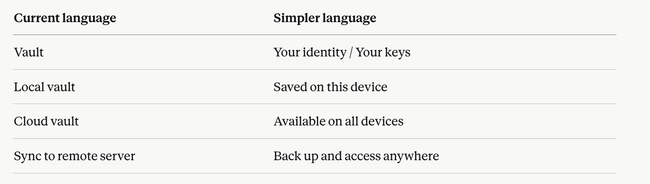
The real user goal, not "create a vault" — it's "use Seed on my devices".
The vault is an implementation detail. Users shouldn't need to understand it to get started.
Where the complexity comes from. The current flow asks users to make an infrastructure decision (local vs cloud) before they've even used the product.
Simplification principle: Framed not as "where do you want your vault?" but as "Do you want to use Seed on other devices?" Yes → we walk them through syncing. No → they stay local, no friction.
Do you like what you are reading? Subscribe to receive updates.
Unsubscribe anytime